Hunnyflash: A Dazzling Script Font for Modern Web Design
As a web designer, choosing the right font can make or break a digital experience. Hunnyflash is a standout script font that blends elegance with modernity, making it a versatile choice for a wide range of web and digital applications. Its clean lines, thoughtful spacing, and detailed strokes give it a polished yet approachable character, ideal for designers who want to inject personality without sacrificing readability.
Visual Characteristics and Digital Appeal
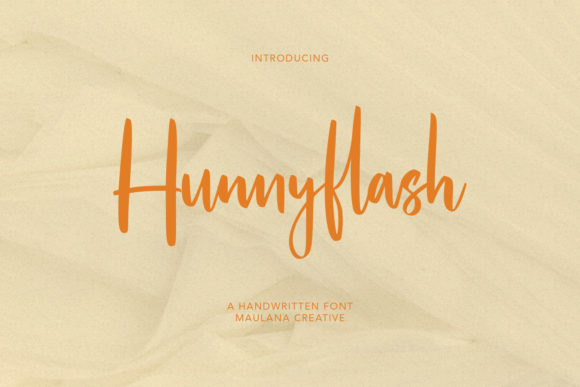
Hunnyflash is a meticulously crafted script font with a natural flow and rhythmic balance. It carries a soft, handwritten charm that feels both intimate and professional. Unlike overly ornate script fonts, Hunnyflash maintains clarity even at smaller sizes, making it suitable for both decorative and functional design elements. Its moderate contrast and open counters ensure it remains legible across different screen sizes and resolutions, especially important for responsive web layouts.
Use Cases in Web and Digital Design
This font shines in key visual areas where brand tone and visual hierarchy matter most. It’s particularly effective in hero headers, landing page titles, and call-to-action buttons where a touch of elegance can elevate the user experience. For example, using Hunnyflash in a boutique fashion store’s homepage banner adds a sense of sophistication and warmth. Similarly, creative professionals like photographers, illustrators, and coaches can use it in portfolio headers or testimonial sections to reinforce their brand voice.
- Hero sections and landing page headlines
- Logo text and brand accents
- Blog headers and featured quotes
- Course sales pages and digital product kits
- Social media graphics and digital ads
Readability and Visual Hierarchy
While Hunnyflash is a script font, it’s designed with digital readability in mind. It works best in short bursts—think titles, subheadings, and highlight text—where it can be appreciated without overwhelming the layout. For optimal visual hierarchy, use it as a display font paired with a clean sans serif or serif for body text. This contrast not only enhances readability but also guides the user’s eye through the page in a natural, intentional way.
When using Hunnyflash on mobile devices, consider its legibility at smaller sizes. It performs best as a headline font rather than for extended body copy. For buttons or small callout text, ensure there’s enough spacing and contrast against the background. On dark backgrounds, subtle shadows or light outlines can help maintain clarity without compromising the font’s organic look.
Brand Tone and User Engagement
Fonts are more than just visual elements—they’re part of a brand’s voice. Hunnyflash conveys warmth, creativity, and a touch of whimsy, making it ideal for brands that want to feel personable yet polished. Whether you're designing a wellness blog, a luxury skincare site, or a creative agency landing page, this font can subtly reinforce your brand’s personality. It’s especially effective when used consistently across different touchpoints, from your website headers to your email banners and product packaging designs.
Font Pairing Strategies
One of the strengths of Hunnyflash is its versatility in font pairing. Since it’s a decorative script, it pairs beautifully with minimalist sans serif fonts like Montserrat, Open Sans, or Lato. These combinations create a clean, modern contrast that’s visually engaging without being cluttered. For editorial-style websites or blogs, pairing Hunnyflash with a serif font like Merriweather or Playfair Display can add a timeless, curated feel to your layout.
- Use Hunnyflash for headlines and logo text
- Pair with a neutral sans serif for body copy
- Choose a serif font for longer editorial content
- Ensure consistent font weights and spacing
- Test combinations across devices and screen sizes
Technical Considerations for Web Use
When implementing Hunnyflash on a live website or digital product, it’s important to check the available file formats and webfont support. Most modern script fonts, including Hunnyflash, come with WOFF, WOFF2, and OTF formats, ensuring compatibility across browsers and platforms. If your project requires multilingual support or special characters, verify that the font includes those glyphs. Many premium script fonts also offer alternate characters and ligatures, giving you more design flexibility for logos or branded headers.
Licensing and Commercial Use
Before embedding Hunnyflash into a live website or client project, always confirm the licensing terms. Most premium fonts require a commercial license for use in web design, online stores, or digital templates. This ensures legal compliance and protects both you and your client from potential issues down the line. If you're using the font in a downloadable template or theme, make sure the license allows for redistribution or that you have the appropriate permissions from the font creator.
Final Notes on Hunnyflash
In the world of digital design, typography plays a critical role in shaping user experience and brand perception. Hunnyflash offers a unique blend of style and functionality that makes it a valuable addition to any web designer’s toolkit. Whether you're crafting a landing page, rebranding a startup, or building an online store, this script font can help you create memorable, visually cohesive digital experiences. By using it thoughtfully within your layouts and pairing it with more neutral typefaces, you’ll enhance both the aesthetic and usability of your designs.